Wednesday, September 22, 2010

Playstation 3 Wireless Controller Options


The Playstation 3 introduced a number of new features in comparison to the PS2.
One of the most notable was the Playstation 3 wireless controller – based on the older controller models but designed to bring a new element to Playstation gaming.

The Playstation 3 Wireless Controller

The wireless controller is designed just like the DualShock wired controller, with the main exception being that it now doesn’t need a wire to work, it connects via Bluetooth instead. This is a major benefit for gamers, as it gives far more freedom of movement when playing, controlling movies and more. Not to mention the fact that wires won’t clutter up the floor anymore!

The Wireless DualShock controller comes in a range of colors, starting with the traditional Playstation black and in red, blue, silver and white (depending on your tastes). These wireless controllers are perfect for most Playstation 3 games, though some of the newer games will work best with the latest Sony invention: Playstation Move.

There are also a number of other wireless accessories designed for the PS3, including a wireless keypad attachment for the controller, Blu-Ray DVD remote and the SIXAXIS controller.

The Latest Playstation 3 Wireless Controller: Playstation Move

Aside from the standard controllers, Playstation has now introduced wireless motion controllers into the spectrum of accessories. The Playstation Move wireless controllers work in combination with the camera to track movements of the body and hands and control the action within the game. Users can also purchase a separate charging station for these controllers to make sure they’re always powered up and ready to go.

How Does the Playstation 3 Wireless Controller Work?

The great thing about Playstation wireless controllers is that they connect through Bluetooth to the console. This means there are no wires to deal with whatsoever, which works in the same way as the controllers on the Nintendo Wii. In total, the PS3 is able to connect up to 7 Bluetooth controllers straight out of the box – making it perfect for multiplayer gaming without having wires everywhere!

Bluetooth has a range of around 30 feet or more, making them very useful. The controllers themselves should last for around 30 hours after being charged for around two and a half hours at a time.

In addition to connecting controllers through Bluetooth, gamers can also take advantage of the Playstation 3 Bluetooth Headset for chatting on the console. It can also be used as a microphone once docked in the charging cradle.

As you can see, the Playstation 3 wireless controller really has come a long way. Without wires, you’re free to play exactly as you want, and make the most of the space all around you.

More Info HERE...

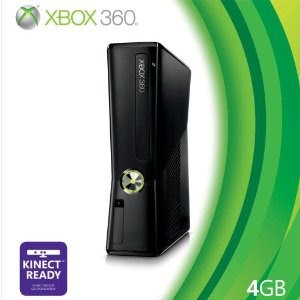
Is the Microsoft Xbox 360 Slim Ready for Kinect?


The release of Microsoft Xbox 360 Kinect is set to change the way we play games.
Instead of needing a separate controller, you ARE the controller yourself! The unique Kinect sensor bar will detect the way that you move, translating that to the way characters move on screen.

However, one of the biggest questions with such a huge new software development is “will Kinect work with the old Xbox 360?” Microsoft have only recently released the new upgraded Xbox 360 Slim, which has caused many people to ask whether they need to buy the upgraded console to play Kinect.

The simple answer: Kinect will work on all Microsoft Xbox 360 consoles, new and old.

How Kinect Connects to the New Xbox 360 Slim

Among the number of upgrades given to the new Xbox 360 Slim is the fact that it’s “Kinect ready”. But what does this mean exactly? All it means is that the new Xbox has a correctly sized port on the back which will allow you to plug the Kinect in when you buy it separately or as part of the Xbox 360 Slim and Kinect bundle.

Do You Need to Buy A Kinect Adaptor Cable?

If you have the old Xbox 360 model, then you’re probably wondering what kind of cables you’re going to need to connect the Kinect. The good news is that the Kinect will come with everything you need in the box to set it up – you’ll just need to plug it in a separate power jack to make sure it’s all working properly. The sensor will require 175MB of memory to work properly.

What About Additional Kinect Accessories?

Despite the fact that you may not need to buy a connector for your new Kinect, you may still be interested in a number of accessories designed to enhance the experience.

Microsoft plan to release a wall mount, TV mount and floor stand for the Kinect to make it fit into your living area more seamlessly. If you need to reposition your Kinect/ Xbox 360 then you may also want to take advantage of the Kinect extension cable, which provides an extra ten foot range. This is priced at around $50.

As you can see, Kinect is ready to work on all Microsoft Xbox 360 systems. With such a simple setup, using only one component, you’ll be up and running in no time at all!

More Info HERE...

Tuesday, September 21, 2010

A Guide To The New Apple iPhone 4 Features


Each time Apple releases a new gadget there’s always a huge fuss over what’s going to be on offer, and the iPhone 4 is no different.

Get The Latest iphone 4 accessory pack from Amazon.com HERE

If you want to know whether it really lives up to the hype, here’s a guide to the iPhone 4 features.

How Do the iPhone 4 Features Compare to Previous iPhone Models?

The iPhone 4 is designed to be an upgrade on previous models, but it doesn’t completely change things. And why would Apple want it to? They already have a very good thing going with the iPhone series that millions of users around the world love. The good news, however, is that they have taken some of the main complaints of older models into account, as well as giving the design a sleek new revamp.

A Guide to the iPhone 4 Specs

Screen: The first thing on this list of new iPhone 4 features is the screen, which now includes a resolution far greater than previous models, at 960 x 640 pixels. This makes the 3.5 inch display very impressive compared to any other phone on the market.

Design: The design, as a whole, is considered to be a lot more slick than the previous iPhone models, and the iPhone 4 no longer makes use of curved lines. You’ll notice a much bigger difference in the iPhone 4 than you ever did since the original model was upgraded to the 3G and 3GS.

Available Models: The iPhone 4 is available in 16GB or 32GB and comes in both black and white (like previous models).

iOS4: The new operating system, iOS4, helps to make the iPhone 4 as impressive at it is. One of the major complaints of the older models was that they didn’t include multitasking. This now comes as standard on the iPhone 4, with much better controls for applications. Although it isn’t quite complete (it doesn’t work with all apps), it’s still a huge improvement.

Features: Some of the other new features that come with the operating system include home screen folders to stop you having to scroll through too many pages of apps, a new master email inbox that will display all of your accounts in one place, and iBooks (originally seen on the iPad) for reading and downloading eBooks.

Photo and Video: The iPhone 4 features also include new video options. There is a front-facing self portrait camera and rear-facing camera, which allow you to make video calls and create videos in 720p, high definition at 30 frames per second. Users will benefit from an improved 5 megapixel camera including LED flash, touch-to-focus feature and fast shutter speed. There are, of course, better camera phones on the market – but this is fantastic for a smartphone.

Is It As Good As Everyone Says?

The iPhone 4 really does offer up a number of noticeable improvements to the previous models. Take a look at the iPhone 4 features and you’ll see a lot added that had been lacking before. The main drawback was the fact that the signal strength seemed to drop when holding the iPhone 4 over the antenna. However, Apple helped to overcome this by offering free cases to its customers.

The truth is that the device is still a huge seller and widely regarded as the best, and most striking, smartphone out there today.


Find Out More HERE...


The Playstation Move Gun and Playstation Move Navigation Controller


The basis behind the Playstation Move system is to use the motion controller in conjunction with the camera for an accurate way to measure your movements and replicate them within games.
However, for those who want even more accuracy (and more fun!) there are two notable accessories available: the Playstation Move Gun and the Playstation Move Navigation controller.
Playstation Move and First Person Shooter Games

When Playstation Move was first announced, many people wondered how it was going to work with first person shooter games: games that required users to replicate holding, aiming and shooting a gun (and not to just move their arms around to create movements). This is why Playstation came out with these impressive add-ons.
The Playstation Move Gun

Sony announced the Playstation Move Gun stating that it would be perfect for first person shooters and rail shooter games, such as Resident Evil. The gun attachment is designed to make it more realistic, and includes laser point aiming to help with precision in the game. Although this might not be useful for many of the games, for those into their shooting games it’s definitely a must-have.

The Playstation Move Navigation Controller

The Playstation Move Navigation Controller is another optional accessory, and will generally be useful in a greater number of the games than the Move Gun will be. It’s also included in the Move Starter Bundle alongside the Move motion controller, camera, and Sports game.

The Navigator includes an analog stick alongside directional buttons, that help you navigate menus and aspects of games, as well as the X and O Playstation buttons. You’ll also get L1, L2 and L3 buttons for advanced functions within games. The Navigation controller features a rechargeable Li-ion battery, and you can use up to two motion controllers and two navigation controllers connected to the system at the same time.

It’s important to note that, where games are compatible with the Playstation Move Navigator, you can also use the standard DualShock controller in its place. This is why the navigator really is optional as far as Move games go.

The Playstation Move Gun and the Playstation Move Navigation controllers aren’t necessary for you to take advantage of Move, but they are a fantastic add-on for anyone who wants the complete gaming experience and perfect control in all genres of game. To get the best prices, opt for the Move bundle and buy the Gun separately.
More Info Here...

Monday, September 20, 2010

Should You Buy Playstation 3 Slim?


If you don’t yet own a console, or have had your old Playstation 3 for a while, then you might consider getting your hands on the newest addition to the Playstation family: the PS3 Slim.

The Slim comes with a number of notable upgrades to the last version of the console, but it’s worth taking a look at whether you should buy Playstation 3 Slim or just stick with your old console.

New Design

The first thing that you’ll notice when looking to buy Playstation 3 is that the “Slim” version has a completely new design. As the name suggests, the newest model is slimmer and generally smaller, coming in at 6.5 centimeters wide, and 29 centimeters height and width. The console is a lot lighter, now weighing just 7 pounds. The finish is now matte black rather than the old glossy style.

Energy Efficiency

Alongside a design overhaul, the PS3 Slim is also designed to be more energy efficient, now making use of a 250-watt power supply as opposed to the older Playstation 3’s 280-watt supply.

Hard Drive

With the release of the PS3 Slim, the price went down and a number of features were increased, including the size of the hard drive. The old Playstation included an 80GB drive, and the PS3 Slim was released with 120GB. There are also packages that include hard drive sizes of up to 320GB which is huge by console standards. The hard drive is removable, which is a bonus.

Backward Compatibility

Like other Playstation 3 models before it, the PS3 Slim still does not come with backward compatibility for older Playstation 2 games. This may influence your decision to buy Playstation 3 Slim, if you have many PS2 games that you still like to play.

Operating Systems

Previous models of Playstation allowed users to install third-party operating systems on them, and this feature has now been removed. However, it’s not something that most users would have had a use for.

Aside from these changes, the best features of the Playstation 3 still remain, such as the Blu-ray disc player and high quality graphics on top games. Whether you buy Playstation 3 Slim will depend upon whether you already own a Playstation. If you’ve had an old PS3 for a while, then it’s a worthy upgrade. If you’ve never owned a Playstation before, then now is a fantastic time to buy one – take advantage of the lowest prices and save even more by opting for bundles that include games and the new Playstation Move motion controller.

Learn More HERE...

Wednesday, September 15, 2010

Kinect Games: Titles Compatible With the New Xbox 360 Motion Controller


Xbox Kinect provides a new way to control your games, and with its release comes a whole range of new Kinect games.
These games take full advantage of everything that the sensor bar has to offer: you no longer need a controller, as you are the controller yourself! Here’s a quick guide to the games released alongside this highly anticipated Xbox 360 add-on.

Kinect Adventures

This is the game that comes packaged with the Kinect, whether you buy the Kinect on its own or as part of an Xbox 360 Slim console bundle. This is rated E, and is designed for the whole family to enjoy together. It consists of twenty different adventures, from obstacle courses to rafting.

Kinectimals

The second of the Kinect games designed for families is Kinectimals, letting you choose a partner to explore with, from one of five animals. You’ll play with your companion, teach it commands, and take part in contests.

Dance Central

This is set to be one of the hottest Kinect games, perfect for children, adults and groups of friends at parties. Dance Central includes full-body dance moves that don’t require any controller to act out. Each track has different choreography depending on whether you’re a beginner or an expert, and tracks range from pop to hip hop.

Kinect Sports

This is Xbox’s answer to Wii Sports, and the sports include volleyball, soccer, bowling, boxing, track & field and table tennis. The main difference is that Kinect Sports offers full body play. You can choose to play alone or as part of a team, and it’s suitable for all levels of fitness.

Kinect Joy Ride

This is the karting game from Kinect, that doesn’t require a controller. There are five different game modes in which you race through different worlds, and navigate your way through the courses using the movements of your body.

Your Shape: Fitness Evolved

The motion control capabilities of Kinect mean that there’s huge scope for fitness, and Your Shape: Fitness Evolved takes full advantage of the fact that the sensor can detect your whole body. Track your burned calories, interact with your personal trainer and perform personalized workouts that keep you motivated.

Zumba Fitness

Zumba is the new fitness and dance craze, and it’s now even more fun thanks to this Kinect game. Your Zumba instructor will guide you through the 30 routines that help you to lose weight while having fun.

Sonic Free Riders

The classic Sonic is now featuring on Kinect, but in a different way than ever before. Choose a character who you will help to race against the competition. The racing takes advantage of full body motion to make your way through the various courses.

Kinect games aren’t ordinary video games: they’ll have you moving your body, jumping, running and more! If you want to get a little exercise, then this is the way to do it! You’ll soon find yourself immersed in what Kinect has to offer, with many more titles on the way.

More Latest Kinect Info HERE

How Much Does Kinect Cost? How You Can Get It Cheaper


Kinect promises big things in the world of motion-controlled gaming, but with its highly anticipated release comes the question of Kinect cost. Is it really worth the price tag, and are there any ways to get hold of it cheaper?


The Kinect Cost: Is It Worth It?

The recommended retail price for Kinect is $149.99, and most retailers will be sticking to this price due to anticipated demand for this new piece of software. This is a lot higher than just about any controller that’s been released for a video game console, though the controller is also different to anything you may have seen before.

This controller isn’t actually a controller in the usual sense of the word. It is, in fact, a sensor bar that incorporates a camera to detect bodily movements (it even works with two players) to replicate them on the screen. You don’t even need to use a controller to select menu options – you just “grab” the items. In this respect, this is extremely new technology which explains the high Kinect cost.

Sony are releasing a similar product known as “Move”. This works slightly differently, using a camera, controller and navigation controller to achieve the effect. The total cost of this equipment is $100 – a useful comparison to the Kinect hardware.

How Can You Get Kinect Cheaper?

Although Kinect carries a hefty price tag, there are ways you can reduce the cost if you also want to buy the console at the same time. Alone, Kinect does come with one game to add value to the package. However, you can buy this game and the Kinect motion sensor along with the new Xbox 360 Slim console for an even bigger saving.

The Xbox 360 console and Kinect bundles come in two options: a 250GB hard drive and a 4GB hard drive. They’re sold alone at $299.99 and $199.99 respectively, and you can add just $100 onto the price if you want the Kinect bundle. This makes the 250GB bundle $399.99 and the 4GB bundle $299.99.

As you can see, the Kinect cost is expensive if you consider it to be a standard controller – but the truth is that it’s much more than that. It really will be a completely new gaming experience, and one that many people are likely going to be willing to pay for. It’ll also be great for families or those who want a new activity to do with their friends.

Click HERE to see the latest offers on the Kinect